


6,99 €
Mehr erfahren.
- Herausgeber: BookRix
- Kategorie: Wissenschaft und neue Technologien
- Sprache: Englisch
Are you ready to turn your creative sparks into physical reality? Whether you want to 3D print custom home fixes, design unique gifts, or simply explore the cutting edge of modern technology, your journey begins here.
Das E-Book können Sie in Legimi-Apps oder einer beliebigen App lesen, die das folgende Format unterstützen:
Veröffentlichungsjahr: 2026
Ähnliche



















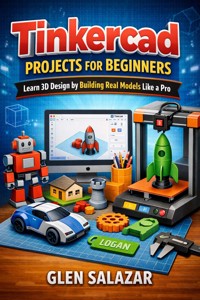
Tinkercad Projects for Beginners
Learn 3D Design by Building Real Models Like a Pro
Glen Salazar
Copyright © 2026 by Glen Salazar
All rights reserved.
No part of this publication may be reproduced, distributed, or transmitted in any form or by any means, including photocopying, recording, or other electronic or mechanical methods, without the prior written permission of the copyright owner, except in the case of brief quotations embodied in critical reviews and certain other noncommercial uses permitted by copyright law.
This book is intended for educational and informational purposes only. While every effort has been made to ensure the accuracy of the information contained in this book, the author and publisher assume no responsibility for errors or omissions, or for damages resulting from the use of the information contained herein.
Tinkercad is a registered trademark of Autodesk, Inc. This book is not affiliated with, endorsed by, or sponsored by Autodesk, Inc.
Published independently.
Disclaimer
The information provided in this book is for educational and informational purposes only. Every effort has been made to ensure the accuracy and reliability of the content presented. However, the author makes no guarantees regarding the completeness, accuracy, or suitability of the information for any specific purpose.
Readers are advised to use their own judgment and discretion when applying the concepts, tools, and techniques described in this book. The author shall not be held responsible for any losses, damages, or issues arising from the use or misuse of the information provided.
This book may reference third-party tools, software, and platforms. All trademarks, service marks, and product names mentioned are the property of their respective owners. The use of these names is for identification and educational purposes only and does not imply endorsement.
This publication is independent and is not affiliated with, sponsored by, or endorsed by the creators or owners of the software discussed.
By reading and using the information in this book, you acknowledge and agree that the author is not liable for any outcomes resulting from the use of the materials and instructions contained herein.
How to use this book
Congratulations on taking the first step toward becoming a proficient 3D designer! You are holding a guide specifically crafted to transform the way you interact with technology. Whether you are a hobbyist looking to create custom household fixes, a senior looking to keep your mind sharp with a new digital craft, or a future inventor preparing to bring your first product to market, this book is your structured companion.
Tinkercad is often described as "simple," but don't let that label fool you. While the interface is clean and the learning curve is gentle, the potential for what you can create is nearly limitless. To get the most out of this experience, you shouldn't just read these pages like a novel; you should live in them. This note is designed to explain the philosophy behind the book's structure and provide you with a strategy to ensure every chapter results in a "win" for your creative journey.
1. The "Project-First" Philosophy
Most technical manuals suffer from a common flaw: they spend 200 pages explaining every single button and menu before they ever let you build something. By the time you get to the "fun part," you’ve already lost interest.
This book flips that script. Aside from the foundational navigation in the first two chapters, every section is anchored by a Real-World Project.
When you start a new chapter, open Tinkercad in a browser window next to this book. Read the introductory theory, but as soon as the text begins describing a move—like dragging a box or resizing a cylinder—do it immediately. Do not wait until the end of the chapter to start your model. 3D design is a "muscle memory" skill; your brain will learn much faster if your hands are moving while you read.
We have intentionally written this guide to feel like a conversation with a mentor sitting right next to you. If a section feels repetitive, it is likely because that specific concept—like the Snap Grid or Grouping—is so vital to your success that it needs to be reinforced.
Pay close attention to the "Pro Tips" scattered throughout the text. These are the "insider secrets" that aren't found in the official help menus. They are the small adjustments—like lifting an object 0.1mm to avoid a visual glitch—that make your work look professional instead of amateur.
The ViewCube Check: Frequently compare your screen's orientation to the descriptions in the book. If the book says, "Look at this from the Top View," make sure your ViewCube in Tinkercad says "Top."
2. Dealing with "The Wall" (Troubleshooting)
In 3D design, things will go wrong. You will accidentally group a hole where you didn't mean to, or you will zoom so far out that your Workplane disappears. Beginners often get frustrated and quit when this happens.
This book treats mistakes as part of the curriculum.
3. Tailoring the Experience to Your Goals
Not every reader is using this book for the same reason.
6. Beyond the Final Page
This book is designed to be a "launchpad," not a destination. By the time you reach the end of Chapter 8, you will have four completed physical-ready models. But the real "graduation" happens when you close this book and start a project that isn't in these pages.
How to use this: Keep this manual on your desk as a reference guide. Even after you’ve finished the projects, the tables on Material Choices and the steps for Slicing Basics will remain valuable resources. Use the "Glossary of 3D Terms" at the end to refresh your memory when you encounter new software in the future.
Summary Checklist for Success
Browser Ready:
Always have Tinkercad open at ww.tintercad.com
Mouse Mastery:
Use a physical mouse with a scroll wheel; trackpads make 3D navigation much more difficult.
One Step at a Time:
Don't skip the "boring" parts of Chapter 1. The way you move your camera determines how well you design.
Save Often:
Tinkercad saves automatically, but it’s a good habit to "Name" your designs clearly so you can find them later.
Be Patient:
Your first gear might not spin. Your first keychain might be too thin. That is okay. Every "fail" is just a data point on the road to becoming a pro.
Table of Contents
Chapter 1: Mastering the 3D Workspace
1.1 Navigation Basics: Zooming, panning, and orbiting without getting lost.
1.2 The Workplane and Grid: Understanding your digital foundation.
1.3 Shapes and Solids: Placing your first primitives and understanding dimensions.
1.4 The Power of Perspective: Using the ViewCube to see your model from every angle.
Chapter 2: The Art of Shaping and Grouping
2.1 Resizing with Precision: Using the ruler tool for exact measurements.
2.2 Creating Holes: Turning solid shapes into negative space.
2.3 Grouping and Ungrouping: Merging multiple shapes into a single, complex object.
2.4 Alignment and Distribution: Making sure your designs are perfectly centered.
Chapter 3: Project 1 – The Custom Designer Keychain
3.1 Designing the Base: Creating a durable foundation.
3.2 Embossing Text: How to add names and initials "Like a Pro."
3.3 Adding the Attachment Loop: Ensuring your model is functional for real-world use.
3.4 Final Polish: Beveling edges for a professional look.
Chapter 4: Project 2 – The Desktop Organizer
4.1 Thinking in Layers: Planning a multi-compartment design.
4.2 Efficient Hollows: Using the "Shell" technique to save 3D printing material.
4.3 Customizing Compartments: Tailoring the design for pens, clips, and phones.
4.4 Strengthening the Structure: Avoiding thin walls that might break.
Chapter 5: Project 3 – Architectural Basics: The Tiny Home
5.1 Scaling for Architecture: Understanding proportions on a smaller scale.
5.2 Cutting Doors and Windows: Precision "Hole" placement.
5.3 Adding the Roof: Using the workplane tool to place objects on angled surfaces.
5.4 Interior Details: Adding simple furniture to bring the model to life.
Chapter 6: Advanced Tinkercad Techniques
6.1 The Scribble Tool: Creating hand-drawn 3D objects.
6.2 Using Shape Generators: Tapping into the community library for complex gears and threads.
6.3 Importing SVG Files: Turning 2D logos into 3D models.
6.4 Duplicate and Repeat: The secret to creating patterns and arrays instantly.
Chapter 7: Project 4 – Mechanical Design: The Working Gear
7.1 Understanding Tolerances: Why 3D printed parts need "breathing room" to move.
7.2 Designing the Gear Teeth: Using rotation and duplication for perfect symmetry.
7.3 Creating the Axle and Pivot: Ensuring your model can spin.
7.4 Stress-Testing Your Design: Checking for overlapping geometry.
Chapter 8: Preparing for the Physical World
8.1 Exporting Your Files: Choosing between STL, OBJ, and GLTF formats.
8.2 Slicing Basics: A beginner’s look at how 3D printers "read" your Tinkercad files.
8.3 Material Choices: Which filaments work best for the projects in this book.
8.4 Troubleshooting Common Design Flaws: Fixing "floating" objects and thin supports.




