


4,60 €
Mehr erfahren.
- Herausgeber: John Wiley & Sons
- Kategorie: Wissenschaft und neue Technologien
- Sprache: Englisch
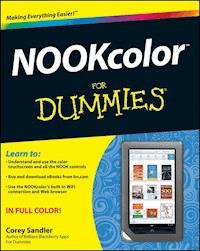
NOOKcolor For Dummies provides readers with all the information they need in order to get the most out of their NOOKcolor e-reader. Key topics covered include: * Introducing the ebook and e-reader concept * Navigating the technical aspects of The NOOKcolor, including touchscreen technology, wireless access, software updates * Downloading and shopping for e-books * Listening to music on your NOOKcolor * Powering the NOOKcolor * Formats * Reading an e-book on an e-reader, including lighting, font adjustments, and so on * Using the Android-based applications that come with the NOOKcolor * Listening to audio books on the NOOKcolor * Creating your own ebooks * Personalizing the Nook, including accessories (B&N expects a strong revenue stream from what they call the "NOOKcolor Eco-System," which will include the accessories, personalizations, applications, and more) * Sharing books on The NOOKcolor * Internet Resources * 10 Things Other Than A Book to Keep on Your NOOKcolor
Sie lesen das E-Book in den Legimi-Apps auf:
Seitenzahl: 164
Veröffentlichungsjahr: 2011
Ähnliche


















NOOKcolor™ For Dummies®
Table of Contents
NOOKcolor™ For Dummies®
by Corey Sandler
NOOKcolor™ For Dummies®
Published byWiley Publishing, Inc.111 River St.Hoboken, NJ 07030-5774www.wiley.com
Copyright © 2011 by Wiley Publishing, Inc., Indianapolis, Indiana
Published simultaneously in Canada
No part of this publication may be reproduced, stored in a retrieval system or transmitted in any form or by any means, electronic, mechanical, photocopying, recording, scanning or otherwise, except as permitted under Sections 107 or 108 of the 1976 United States Copyright Act, without either the prior written permission of the Publisher, or authorization through payment of the appropriate per-copy fee to the Copyright Clearance Center, 222 Rosewood Drive, Danvers, MA 01923, (978) 750-8400, fax (978) 646-8600. Requests to the Publisher for permission should be addressed to the Permissions Department, John Wiley & Sons, Inc., 111 River Street, Hoboken, NJ 07030, (201) 748-6011, fax (201) 748-6008, or online at http://www.wiley.com/go/permissions.
Trademarks: Wiley, the Wiley Publishing logo, For Dummies, the Dummies Man logo, A Reference for the Rest of Us!, The Dummies Way, Dummies Daily, The Fun and Easy Way, Dummies.com, Making Everything Easier, and related trade dress are trademarks or registered trademarks of John Wiley & Sons, Inc. and/or its affiliates in the United States and other countries, and may not be used without written permission. All other trademarks are the property of their respective owners. Wiley Publishing, Inc., is not associated with any product or vendor mentioned in this book.
Limit of Liability/Disclaimer of Warranty: The publisher and the author make no representations or warranties with respect to the accuracy or completeness of the contents of this work and specifically disclaim all warranties, including without limitation warranties of fitness for a particular purpose. No warranty may be created or extended by sales or promotional materials. The advice and strategies contained herein may not be suitable for every situation. This work is sold with the understanding that the publisher is not engaged in rendering legal, accounting, or other professional services. If professional assistance is required, the services of a competent professional person should be sought. Neither the publisher nor the author shall be liable for damages arising herefrom. The fact that an organization or Website is referred to in this work as a citation and/or a potential source of further information does not mean that the author or the publisher endorses the information the organization or Website may provide or recommendations it may make. Further, readers should be aware that Internet Websites listed in this work may have changed or disappeared between when this work was written and when it is read.
For general information on our other products and services, please contact our Customer Care Department within the U.S. at 877-762-2974, outside the U.S. at 317-572-3993, or fax 317-572-4002.
For technical support, please visit www.wiley.com/techsupport.
Wiley also publishes its books in a variety of electronic formats. Some content that appears in print may not be available in electronic books.
Library of Congress Control Number is available from the publisher.
ISBN: 978-1-118-05781-0
Manufactured in the United States of America
10 9 8 7 6 5 4 3 2 1
About the Author
Corey Sandler is a voracious reader and an indefatigable author of books. Also magazines and, ages ago, newspapers. He has written more than 160 books at last count, and of those 52 are about computers and technology, and the others are about history, sports, and business. Sandler travels all over the world conducting research and lecturing and consulting; he is within half a dozen of reaching the real century mark of countries visited: watch out Moldova, Kaliningrad, and Bolivia. You’re up next.
Okay, so sometimes he is fatigable. That happens when you carry 150 pounds of luggage including a laptop, three cameras and lenses, a dozen books to read and consult, and a hogshead of lecture notes printed out and neatly bound to sit on a lectern. And that’s why he’s a fan of electronic books. It’s good for his back.
Sandler studied journalism (and took some courses to program a gigantic mainframe computer) at Syracuse University. He began his career as a daily newspaper reporter in Ohio and then New York, moving on to a post as a correspondent for Associated Press. From there he joined Ziff-Davis Publishing as the first executive editor of PC Magazine. He wrote his first book about computers in 1983 and hasn’t come close to stopping. When he’s not on the road and living on his smartphone and computer, he’s at home on Nantucket Island thirty miles out to sea off the coast of Massachusetts. He shares his life with his wife Janice; their two grown children have their own careers elsewhere on the continent.
You can see Sandler’s current list of books on his web site at www.sandlerbooks.com and send an e-mail through the links you find there. He promises to respond to courteous inquiries as quickly as he can. Spam, on the other hand, will receive the death penalty.
Dedication
This book, like so many of the 160 I’ve written, is dedicated to my family. To Janice, who has put up with me for more than thirty years and still laughs at most of my jokes. To my children William and Tessa, who have progressed from laptops (in diapers) to careers and lives of their own. I am proud to be husband, father, and personal IT consultant to the clan.
Author’s Acknowledgments
This book bears just one name on the cover, but that’s only part of the story.
Thanks to the smart and capable crew at Wiley, including Katie Mohr and the rest of the editorial and production staff, who turned the taps of my keyboard into the book you hold in the electronic device in the palm of your hand.
Also, my appreciation to long-time publishing collaborator Tonya Maddox Cupp, who managed the process with grace and humor.
I received invaluable assistance — right in the middle of the crazy time of a product launch — from Carolyn Brown, James Balog, Brooke Barona, and Arielle Berlin at Barnes & Noble.
And as always, thanks to you for buying this book. Go forth and enjoy your NOOKcolor and millions of great works of literature, as well as humble works like the very one you are reading now.
Publisher’s Acknowledgments
We’re proud of this book; please send us your comments through our online registration form located at www.dummies.com/register/.
Some of the people who helped bring this book to market include the following:
Acquisitions, Editorial, and Media Development
Senior Acquisitions Editor: Katie Mohr
Project and Copy Editor: Tonya Maddox Cupp
Editorial Manager: Jodi Jensen
Editorial Assistant: Amanda Graham
Sr. Editorial Assistant: Cherie Case
Publishing and Editorial for Technology Dummies
Richard Swadley, Vice President and Executive Group Publisher
Andy Cummings, Vice President and Publisher
Mary Bednarek, Executive Acquisitions Director
Mary C. Corder, Editorial Director
Publishing for Consumer Dummies
Diane Graves Steele, Vice President and Publisher
Composition Services
Debbie Stailey, Director of Composition Services
Lesen Sie weiter in der vollständigen Ausgabe!
Lesen Sie weiter in der vollständigen Ausgabe!
Lesen Sie weiter in der vollständigen Ausgabe!
Lesen Sie weiter in der vollständigen Ausgabe!
Lesen Sie weiter in der vollständigen Ausgabe!




