


27,99 €
Mehr erfahren.
- Herausgeber: John Wiley & Sons
- Kategorie: Wissenschaft und neue Technologien
- Sprache: Englisch
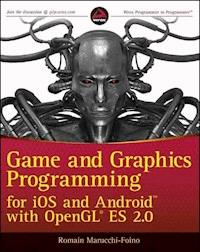
Develop graphically sophisticated apps and games today! The smart phone app market is progressively growing, and there is new market gap to fill that requires more graphically sophisticated applications and games. Game and Graphics Programming for iOS and Android with OpenGL ES 2.0 quickly gets you up to speed on understanding how powerful OpenGL ES 2.0 technology is in creating apps and games for amusement and effectiveness. Leading you through the development of a real-world mobile app with live code, this text lets you work with all the best features and tools that Open GL ES 2.0 has to offer. * Provides a project template for iOS and Android platforms * Delves into OpenGL features including drawing canvas, geometry, lighting effects, character animation, and more * Offers explanation of full-function 2D and 3D graphics on embedded systems * Addresses the principal technology for hardware-accelerated graphical rendering Game and Graphics Programming for iOS and Android with OpenGL ES 2.0 offers important, need-to-know information if you're interested in striking a perfect balance between aesthetics and functionality in apps.
Sie lesen das E-Book in den Legimi-Apps auf:
Seitenzahl: 482
Veröffentlichungsjahr: 2012
Ähnliche



















CONTENTS
Chapter 1: Getting Started
Software Requirements
Downloading the Book’s SDK
Importing Projects
The Template
Summary
Chapter 2: Setting Up Your Graphic Projections
The Three Basic Types of Projections
Orthographic 2D Projection
Orthographic Projection
Perspective Projection
Summary
Chapter 3: Dealing with Complex Geometry
The Wavefront File Format
Preparing the OBJ Viewer Code
Loading an OBJ
Building the Shaders
Building the VAO
Rendering Momo
Handling Touche
Per-Vertex Lighting
Making Momo Furrier
Summary
Chapter 4: Building a Scene
Handling Multiple Objects
The Code Structure
Loading and Drawing the Scene
The Shaders Code
The Different Object Types
The Drawing Sequence
Fixing the Scene
Per-Pixel Lighting
Summary
Chapter 5: Optimization
The Base App
Triangles to Triangle Strips
Building Triangle Strips
Texture Optimization
Adding 16-Bit Texture Conversion
PVR Texture Compression
Faking Details
Geometry and Shaders LOD
Texture Atlas
Managing States in Software
Automatic Shader Optimization
Summary
Chapter 6: Real-Time Physics
Types of Physical Objects
Physics Shapes
Using Bullet
Hello Physics
Collision Callbacks, Triggers, and Contacts
2D Physics
3D Physics
Summary
Chapter 7: Camera
Touch and Go!
The Camera Frustum
Camera Fly Mode
First-Person Camera with Collision Detection
3D Camera Tracking
Third-Person Camera with Collision
Summary
Chapter 8: Pathfinding
Recast and Detour
Navigation
Creating the Navigation Mesh
3D Physics Picking
Player’s Auto Drive
Visualizing the Way Points
Catch Me If You Can!
Know Your Enemy
Game State Logic
Summary
Chapter 9: Audio and Other Cool Game Programming Stuff
OpenAL
OGG Vorbis
Hello World OpenAL Style
Initializing OpenAL
Static In-Memory Sound Playback
Positional Sound Source
Piano Game
Rolling Ball Game
Summary
Chapter 10: Advanced Lighting
Types of Lamps
Let There Be Light
Point Light
Multiple Lights
Making the Shader Program Dynamic
Summary
Chapter 11: Advanced FX
Render to Texture
Post-Processing Effects
Projected Texture
Projector Shader
Projected Real-Time Shadows
Casting Shadows Using the Depth Texture
A Few More Words about the Frame Buffer Object
Particles
Summary
Chapter 12: Skeletal Animation
Traditional vs. Modern Animation Systems
The MD5 File Format
Loading an MD5 Mesh
Animating the Mesh
Blending Animation
Additive Blending
Summary
Introduction
Advertisements
Chapter 2
Setting Up Your Graphic Projections
WHAT’S IN THIS CHAPTER?
Understanding how the different types of projection matrices work, how to use them, and whenGetting familiar with the template application that comes with the SDK and learning how to customize it for your specific needsBuilding your first practical application — learning how to set it up and use the different types of projectionsBefore you can draw any graphics onscreen, you first need to create a projection matrix. The type of graphics you plan to use will have a direct impact on the creation of this matrix. Whether it is 2D, 2.5D, or 3D, each type of projection matrix will require a different initialization, allowing you to create the necessary perspective for your specific needs.
In this chapter, you will learn about the three primary types of projections used in modern mobile games and how to use them.
In addition, this chapter will teach you how to work with this book’s template project and walk you through three progressive exercises. In these exercises, you will learn how to manipulate the most common types of graphic projections and draw simple geometry onscreen; handle vertex and fragment shaders and link them to a shader program; manipulate vertex attributes and uniform variables; translate, rotate, and scale basic geometry; and create a simple camera look-at matrix.
THE THREE BASIC TYPES OF PROJECTIONS
When drawing using OpenGL ES, you always have to keep in mind the sequence of your drawings and in which perspective space you want to draw. Needless to say, this sequence will directly affect the type of projection and the sequence of creation of your projection’s matrix.
For example, if you want to draw a heads-up display (HUD) that contains your character data on top of your scene, you first need to set up a 2D, 2.5D, or 3D perspective (depending on the type of game you are working on), and then draw your game scene. After your scene is rendered in the color buffer, you need to render your character life bar, ammo, etc. on top of it. Simply scaling your HUD graphics onscreen to fit the current drawing perspective would deteriorate their overall aspect ratio, eventually making them distorted. Knowing this, the right way to draw the HUD of your game would be to create a projection matrix that has a ratio of 1 unit to 1 pixel. Since your HUD consists of multiple 2D graphics, and it is important to respect their ratio onscreen, a 1:1 2D projection will allow you to draw them consistently onscreen.
There are three distinct types of projections that can be used in any game genre:
Lesen Sie weiter in der vollständigen Ausgabe!
Lesen Sie weiter in der vollständigen Ausgabe!
Lesen Sie weiter in der vollständigen Ausgabe!
Lesen Sie weiter in der vollständigen Ausgabe!
Lesen Sie weiter in der vollständigen Ausgabe!
Lesen Sie weiter in der vollständigen Ausgabe!
Lesen Sie weiter in der vollständigen Ausgabe!
Lesen Sie weiter in der vollständigen Ausgabe!
Lesen Sie weiter in der vollständigen Ausgabe!
Lesen Sie weiter in der vollständigen Ausgabe!
Lesen Sie weiter in der vollständigen Ausgabe!
Lesen Sie weiter in der vollständigen Ausgabe!
Lesen Sie weiter in der vollständigen Ausgabe!
Lesen Sie weiter in der vollständigen Ausgabe!
Lesen Sie weiter in der vollständigen Ausgabe!
Lesen Sie weiter in der vollständigen Ausgabe!
Lesen Sie weiter in der vollständigen Ausgabe!
Lesen Sie weiter in der vollständigen Ausgabe!




